For Mac
Your meetings,
transcribed privately.
Record any system audio or your microphone. Minuette transcribes on your Mac, then turns the transcript into structured notes with Apple Intelligence or a local AI model. Your recordings stay on your device.
Requires macOS 26 or later
Pricing
No subscription
Your recordings
Stay on your Mac
Transcription
On-device, always
How it works
Two steps, then done.
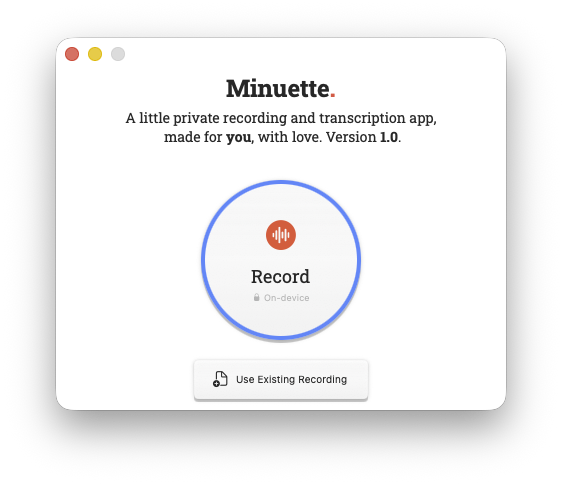
Record. Transcribe. Minuette handles the transcription and notes.
Click to record
Capture system audio from any app: meetings, calls, videos, podcasts. Add some notes while recording and they get woven into the AI summary alongside the transcript.
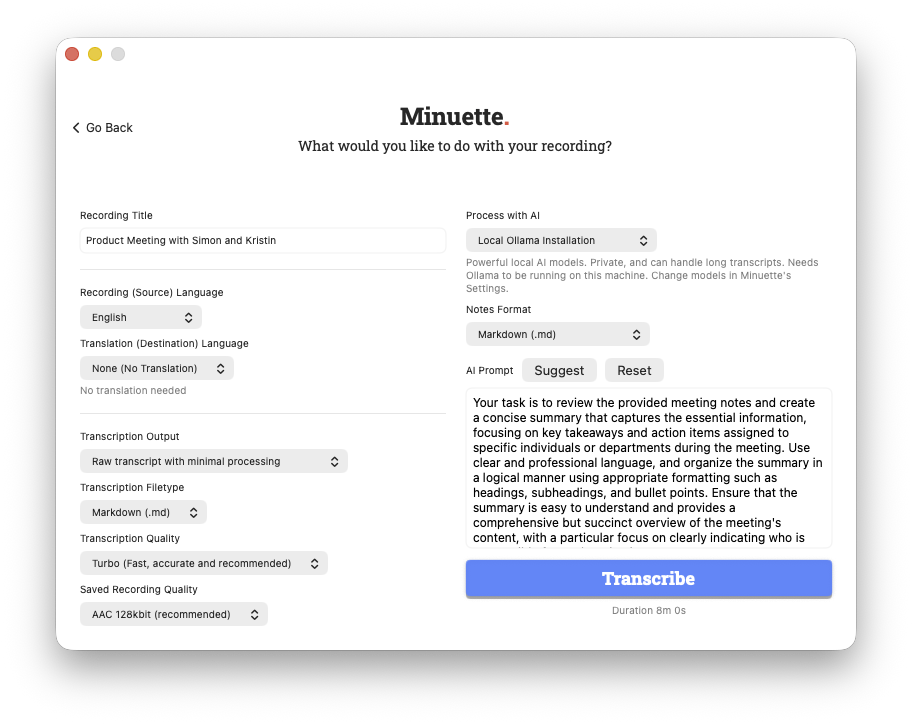
Choose your options, then transcribe
Pick your language, transcription quality (processing speed), AI mode, and output format. Minuette generates a structured summary and saves everything to a folder you choose.
Features
Everything you need. Nothing you don't*.
Built for people who sit in a lot of meetings and don't want a cloud service to hear or read what was said.
- On-device transcription
- Configurable transcription (speed vs. quality)
- Three AI processing modes
- Notes during recording
- Custom AI prompts
- AI-powered context aware suggest-a-prompt
- Translation support
- Plain text or Markdown output
- WebVTT caption export for videos
*I'd love to hear your feedback and feature requests too. minuette@silevitas.com.
Privacy
Private by design,
not by policy.
Your audio and transcripts stay on your Mac. That's not a setting you need to enable. It's how the app is built.
- Transcription runs on your Mac using Whisper, an open-source speech recognition engine built by OpenAI. No audio is ever sent to any third-party server.
- Apple Intelligence processing stays on-device or uses Apple Private Cloud Compute under Apple's published privacy guarantees.
- Ollama processing sends your transcript to the AI model of your choice running on your Mac.
- No analytics, crash reporting, or telemetry of any kind goes to the developer (me). I'm not interested, and I don't want it.
Support
Need help?
Questions, bugs, or feature requests: email me directly and I'll get back to you personally.
minuette@silevitas.comFAQ
Frequently Asked Questions
Scroll down within the list for more.
-
What help is available?
On first run, hovering over each control in Minuette will show a description of what it does. This hint can be shown at any time by holding shift while hovering. You can also choose to reset Minuette to show all hints again via the Settings page (
Command+,), accessed via the system menu at the top of the screen. -
Does Minuette ever send my audio or transcripts to a server?
No. Transcription runs entirely on your Mac using OpenAI's Whisper; no audio ever leaves your device. If you use AI note processing, it's handled either by Apple Intelligence (on-device or Apple's Private Cloud Compute, under Apple's published privacy commitments) or a locally-running Ollama model. Either way, nothing goes to any server operated by me. Your recordings are written only to the folder you choose, and I never see them.
-
Why does Minuette ask for Screen Recording permission?
This one surprises people, understandably. macOS routes system audio (the audio playing through your speakers from Zoom, Meet, YouTube, etc.) through the Screen Capture subsystem. Minuette needs this permission to hear that audio. It does not capture, record, or store any screen content at any point. No screenshots, no video, nothing visible. It's the same mechanism QuickTime Player and other audio tools use.
-
Is there a subscription?
No subscription, ever. It's a one-time purchase on the Mac App Store.
-
Does it work with Zoom, Teams, Google Meet, and FaceTime?
Yes. Minuette captures system audio, so anything playing through your Mac (Zoom, Teams, Google Meet, FaceTime, Slack calls, podcasts, YouTube, whatever) can be recorded and transcribed. Start recording in Minuette before your call (or any time during), stop when you're done, and then process.
I cannot guarantee audio capture with DRM-protected audio, but I wouldn't recommend using Minuette for that anyway.
-
Do I need to use Apple Intelligence?
No. For AI note processing, you have two options: Apple Intelligence or Ollama running locally. I generally recommend using Ollama as it handles longer transcripts better today. This may change in future with Apple's ongoing improvements to their platform.
-
Can I choose between local or Private Cloud Apple Intelligence?
Not today. Apple decides which to use, likely based on the length or complexity of the data to be processed, but there's very little transparency. Either way, I believe you can consider the data private thanks to Apple's general privacy policies.
-
What languages does Minuette support?
Whisper supports transcription in over 90 languages including English, Spanish, French, German, Japanese, Chinese, Arabic, Portuguese, Italian, Korean, and many more. You can also use Minuette's built-in translation to convert a transcript into another language using macOS's on-device translation engine. Translation requires macOS support for any specific language combination.
-
How large are the transcription models? Do I need to download anything?
Yes, Whisper models download automatically on first use. The Small preset is around 500 MB, Medium around 1.5 GB, and "Turbo" around 1.6 GB. Downloads happen once and are stored locally; after that, transcription works completely offline. Minuette doesn't show the size in-app because those models will potentially change. See the latest sizes here: ArgmaxInc on Hugging Face.
-
Can I transcribe an existing audio file?
Yes. You don't have to record through Minuette. You can open any existing audio or video file (AIFF, M4A, MP3, WAV, MP4, MOV, and more!) and run it through transcription and AI processing the same way. I've used this feature to quickly generate captions for a video that I needed to share urgently.
-
Does it work offline?
Yes, with the right setup. Transcription is fully offline once the Whisper model is downloaded. For AI processing, choose either Apple On-Device or Ollama: both run locally with no internet required (except for the initial AI model download). The only mode that needs a connection is Apple Intelligence cloud-assisted, which uses Apple's Private Cloud Compute.
-
What is Ollama?
Ollama is open-source software for running AI models on your computer. Instead of sending a transcript to ChatGPT, Claude, or any other AI run by a third-party who can use your data for whatever reason they want, Minuette can use Ollama to do all of that processing locally. No transcript data will ever go anywhere that isn't under your direct control and visibility. Private data that you don't want to retain? Just delete it from Ollama and it's gone forever. You can't do that with any public AI. This is not to say that all, or even any use of your data by these companies is nefarious; it's just not yours anymore and you don't have a say what happens to it.
-
Is this only available on Mac?
That's right. macOS 26+ specifically. I have no plans to build Minuette for any other platform.
-
What Open Source software is used in Minuette?
- Argmax WhisperKit: For integrating OpenAI's Whisper into a Swift application.
- Jinja: For generating AI chat templates.
- Ollama-swift: For interacting with the Ollama API.
- Roboto Slab is the heading font used in Minuette and this page.
-
Is Minuette Open Source?
Not today. Maybe in the future.
-
Was AI used to build Minuette?
Yes! Claude Code in this case. I'm a Product Manager by trade and built Minuette in the same way I would approach any other product these days. I researched alternatives, detailed my concept, sketched basic UX design, wrote requirements, and then iterated in partnership with the AI until I was happy. I wrote some Swift code myself, and tweaked plenty of it by hand, but most was authored by Claude step-by-step following my design. From the start I intended Minuette to be lovable software that I would use myself, and I have used it A LOT, both because it's handy, and because I want it to be better than just good enough, and it has improved a lot since the first versions. Shout out to Impeccable for the invaluable help with UX design polish and WCAG 2.2 AA accessibility auditing.
-
Why the name "Minuette"?
It originally came from the concept of taking meeting "minutes", combined with the French word "minuet" (specifically referring to the type of music rather than the dance), which in turn comes from the word "menuet", meaning "small" —— the ethos behind this whole project. It's a made-up word intended to be pronounced the same as the English pronunciation of minuet, with a hard "T". I learned later that it's also the name of a My Little Pony character. I was not going for that.
-
Is there a roadmap?
I have some ideas, and will certainly be updating the app over time. Three current roadmap items are:
- Fully validated and tested support for the public release of macOS 27, Golden Gate.
- Support for macOS 27's SpeechAnalyzer framework to complement Whisper. It's too soon to say if it would mean the removal of Whisper entirely, but it's worth considering if the accuracy/speed is good enough.
- Support for macOS 27's Foundation Model AI, as it's a significant update to what was available on macOS 26. This would be a complement to Ollama, with the goal of Foundation Model for OOTB ease-of-use, and Ollama for more advanced users and use cases.
-
Who are you?
Thanks for asking! silevitas.com
